
Download AI Tattoo Generator App – Free AI‑Powered Tattoo Design Tool
Overview: Revolutionizing Tattoo Design with Artificial Intelligence
The AI Tattoo Generator App is a web‑based platform that turns a simple text description into a fully realized tattoo concept. By leveraging state‑of‑the‑art generative AI models, the app can produce designs that span a broad spectrum of popular styles—from hyper‑realistic portraits to sleek tribal patterns and minimalist line art. The service is built for both seasoned tattoo enthusiasts and first‑time ink seekers who want a visual representation before committing to a permanent masterpiece.
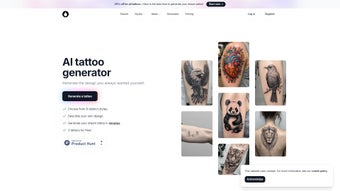
What makes this tool stand out is its blend of creativity and practicality. Users type in what they imagine—a roaring lion, a celestial compass, a vintage ship, or even an abstract phrase—and within seconds the AI renders several variations. The interactive gallery showcases trending concepts, offering inspiration and a quick way to explore emerging trends in body art. The interface is deliberately clean, with a focus on usability: drag‑and‑drop image previews, instant download options, and a “favorite” button to save designs for later discussion with a tattoo artist.
Beyond aesthetics, the AI Tattoo Generator App streamlines the planning stage. Traditional sketching can take hours or require a professional artist’s time. This platform cuts that effort down to minutes, letting users experiment with color palettes, placement ideas, and scale without any cost. Because it runs entirely in the browser, there is no need to install bulky software, and the service respects privacy—no personal data is stored beyond the session unless the user chooses to create an account for saving designs.
The app also includes a community‑driven “trend feed” that highlights the most popular prompts of the week, helping users discover fresh ideas they might not have considered. Whether you are looking for a subtle script on the wrist or a full‑sleeve masterpiece, the AI Tattoo Generator App gives you a fast, risk‑free sandbox to test concepts before you sit in the chair.
Features & How It Works: From Text Prompt to Tattoo Sketch
The AI Tattoo Generator App is packed with features designed to make the tattoo‑design journey both fun and efficient. Below is a comprehensive feature list that illustrates the depth of functionality:
- Text‑to‑Image Generation: Input a descriptive phrase (e.g., “minimalist mountain silhouette”) and receive multiple AI‑crafted options in seconds.
- Style Library: Choose from realism, tribal, neo‑traditional, watercolor, line‑work, and many more styles to guide the AI’s output.
- Interactive Gallery: Browse curated designs such as majestic lions, mythical dragons, and cultural symbols for instant inspiration.
- Real‑Time Editing: Adjust color, size, and orientation with sliders; toggle background transparency for placement mock‑ups.
- High‑Resolution Export: Download designs in PNG or SVG format at 300 dpi, ready for print or direct sharing with a tattoo artist.
- Save & Share: Create an account to store favorite designs, generate shareable links, or export a PDF portfolio.
- Privacy‑First Architecture: All image generation occurs client‑side; no personal data is retained on the server unless opted‑in.
- Cross‑Platform Accessibility: Works on Windows, macOS, Linux, Android, and iOS browsers without additional plugins.
Behind the scenes, the app utilizes a diffusion‑based AI model fine‑tuned on a curated tattoo dataset. When a user submits a prompt, the model interprets key visual elements—line weight, shading style, thematic motifs—and synthesizes them into a cohesive composition. The process typically takes under five seconds, thanks to optimized inference pipelines hosted on cloud GPUs.
For those unfamiliar with AI terminology, the workflow is deliberately straightforward: type → select style → generate → refine → download. The “refine” step is where the real power lies; users can iterate quickly, swapping styles or tweaking prompts to see how subtle changes affect the final artwork. This iterative loop encourages creative exploration, allowing anyone to arrive at a design that truly feels personal.
Additionally, the app offers a “batch mode” for users who want to explore multiple ideas at once. By uploading a CSV file of prompts, the AI will generate a set of images in parallel, saving time for professional designers who need to present several concepts to clients. All generated assets are automatically organized into folders, making post‑generation management a breeze.
Installation, Usage & Compatibility – Plus Pros and Cons
Since the AI Tattoo Generator App is a web application, there is no traditional installation process. Users simply navigate to the official website, create an optional account, and begin designing instantly. For those who prefer a shortcut, a progressive web app (PWA) version is available, allowing the app to be “installed” on a desktop or mobile home screen for offline access to saved designs.
Getting Started in Three Easy Steps:
- Visit the Site: Open aitattoogenerator.com in any modern browser (Chrome, Firefox, Safari, Edge).
- Create a Prompt: Type a description of your envisioned tattoo, choose a style from the dropdown, and hit “Generate”.
- Refine & Export: Use the editing tools to adjust color, scale, or line weight, then click “Download” to save a high‑resolution file.
The platform is fully compatible with Windows 10/11, macOS 10.15+, Linux distributions, as well as mobile operating systems Android 8.0+ and iOS 13+. Because all processing is performed in the browser, users benefit from fast load times and low latency, even on modest hardware.
Pros
- Instant generation eliminates the need for costly artist sketches.
- Wide variety of styles accommodates diverse aesthetic preferences.
- No software download; works on any device with a modern browser.
- High‑resolution exports suitable for professional tattoo studios.
- Free tier available with generous daily generation limits.
- Progressive Web App enables offline access to saved concepts.
Cons
- AI may produce occasional artifacts that require manual cleanup.
- Complex, multi‑element designs can need several prompt refinements.
- Free version limits the number of high‑resolution downloads per day.
- Currently no built‑in vector editing beyond basic scaling.
- Batch mode requires a stable internet connection for parallel processing.
Overall, the AI Tattoo Generator App balances ease of use with professional‑grade output. While it isn’t a complete replacement for a seasoned tattoo artist’s consultation, it serves as an invaluable brainstorming companion, especially for users on a budget or those seeking quick visual references.
FAQ and Final Thoughts – Your Next Tattoo Awaits
Is the AI Tattoo Generator App really free?
Yes, the core functionality is free. Users can generate up to five high‑resolution designs per day without a subscription. A premium plan unlocks unlimited generations, priority processing, and additional export formats.
Can I use the generated designs commercially?
The free tier grants personal use only. For commercial or resale purposes, you must upgrade to the paid plan, which includes a commercial‑use license and higher resolution assets.
How secure is my data when I create an account?
Security is a priority. Passwords are hashed with bcrypt, and all connections use HTTPS. Design files are stored encrypted and are deleted after 30 days of inactivity unless you download them.
Do I need any special hardware to run the AI models?
No special hardware is required. The heavy lifting is done on cloud servers, so a standard laptop or smartphone with a stable internet connection is sufficient.
Can I edit the AI‑generated image after download?
Absolutely. Downloads are provided in PNG (raster) and SVG (vector) formats, allowing you to fine‑tune line work, colors, or scaling in any graphic‑design software before presenting the design to your tattoo artist.
In summary, the AI Tattoo Generator App is a powerful, accessible, and secure solution for anyone looking to visualize tattoo ideas before making a lifelong commitment. Its blend of AI creativity, user‑friendly workflow, and cross‑platform compatibility makes it a standout tool in the growing niche of digital body‑art planning.
Ready to turn your imagination into ink? Download the AI Tattoo Generator App now, start experimenting with limitless designs, and bring your next masterpiece to life with confidence.



.png)



